


The Lobster Data web application’s mechanism for encrypting credentials in configuration files is reverse engineered to produce a standalone decryption tool.
The Lobster Data Application
Lobster Data (Lobster DATA GmbH) is a no‑code platform for data syncing and ETL. It lets organizations integrate different systems, move data between them, and automate routine processes from a web UI. Instead of custom scripts, administrator can define workflows in the browser while the platform handles the underlying EDI and interacts with various platform APIs in the background.
The Lobster Data Platform runs on a Java‑based Integration Server that hosts the main Lobster Integration application and exposes its administrator web console over HTTP. The Integration Server connects to a database service for its repository “hub” database, using JDBC drivers for various DBMS such as Microsoft SQL Server, Oracle Database, PostgreSQL, and others. Application files, libraries, and configuration live in the Lobster Data installation directory on the Integration Server, while system metadata and runtime state are stored in the external “hub” database.
For the purposes of this article, our primary area of interest is the Integration Server where the admin web console and configuration files of interest live.
Accessing Configuration Files
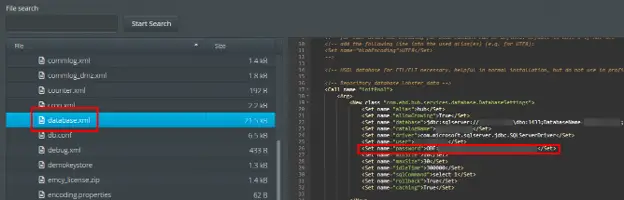
The configuration files we identified are stored within the “etc” folder in the application installation directory. In our scenario, we had gained access to the admin web console and did not have credentials to the underlying Windows OS. Luckily for us, however, the admin console provides a File Manager utility that enables some basic interactions with the host file system.
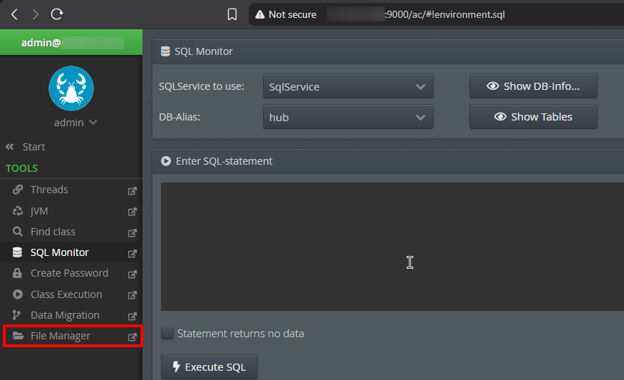
Some files on the server, such as “system.conf” and “startup.xml”, may contain plaintext credentials such as SMTP authentication details and API keys. But of course, a layup is never quite as satiating as a full-on windmill dunk, so we pressed on looking for a way to make that highlight reel. Soon we found a more interesting target, credentials to a Microsoft SQL Server instance with an account password that seemed to be using some kind of encryption or obfuscation as indicated by the “OBF:<ciphertext>” formatting. Could this be our lane to the basket?
Credential Protection Mechanisms
Some quick research revealed that Jetty, a Java-based web server, supports encryption of credentials in configuration files using an identical notation to indicate the presence of said protection for a given string. This mechanism is implemented via the “org.eclipse.jetty.util.security.Password” utility. In this case, the utility did not work to decode the ciphertext, indicating that a custom algorithm or modified implementation was in place.

Digging into the documentation for Lobster Data, we confirmed that this functionality was indeed baked into the application itself as part of an extended Jetty-like utility that supports a range of credential protection mechanisms including password-based encryption (PBE) and asymmetric encryption using the Java Keystore. The mechanism we are currently up against is described merely as obfuscation to protect against casual browsing by non-technical users.
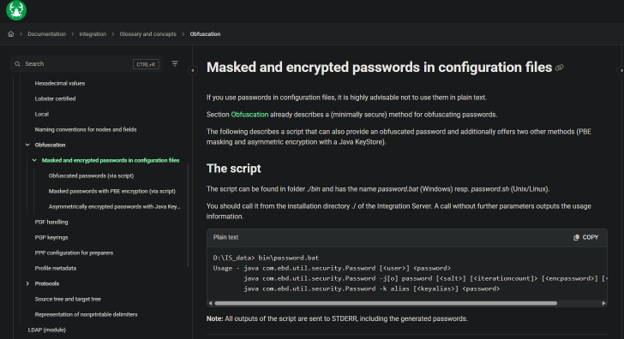
The protection routines are supposedly implemented in the “com.ebd.util.security.Password” utility according to the documentation and the “password.bat” code present on the Integration Server filesystem. Game on.
Reversing the Obfuscation Routine
Heading back to the File Manager utility exposed within the web admin console, we exfiltrated a few JAR files of interest to start searching for the one which contained the methods handling obfuscation and deobfuscation operations. The JAR format is a standard ZIP‑based archive that typically contains compiled Java CLASS files and other resources. This Java bytecode can be decompiled by most modern Java IDEs and tooling, allowing for effective review of the application’s logic even without original source files. While many applications employ obfuscation or packing mechanisms during the build process to hinder analysis or scramble symbol names, no such protections were observed in this case. Loading each JAR into our JetBrains IntelliJ IDE (or IDEA…), we finally confirmed the “hub.jar” file includes the “com.ebd.util.security.Password” utility with the coveted “deobfuscate” method.
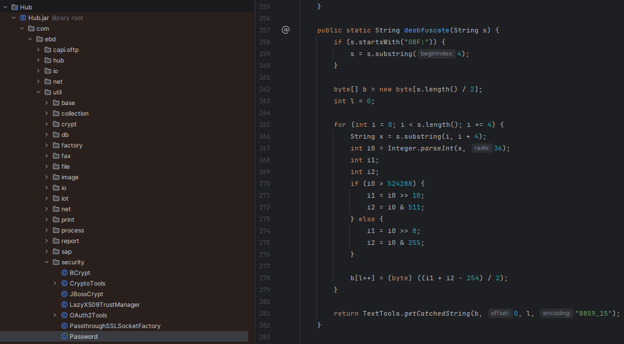
If we compare this to the Jetty source code, we can see that the overall flow and concept is really pretty similar. Aside from some nuanced differences, they both follow the same basic pattern: derive bytes from the plaintext, combine those bytes into integers, then Base‑36 encode those integers into chunks that are concatenated to produce the ciphertext string. The key difference lies in how the two schemes pack and unpack those bytes into the integer values before Base‑36 encoding. The Lobster Data variant uses a different bit‑layout and arithmetic, which is a breaking change that prevents use of the Jetty utility to recover plaintext credentials from ciphertext produced by the Lobster Data utility.
Custom Decryption Tool
We are in the paint now – victory is almost in hand. Obviously, we don’t want to ever be forced to invoke Java to get things done when we can avoid it, so we decided to make a standalone Python decryption utility. Source code in hand, the port was not a difficult task. If you’ve ever been here before though, surely you can understand how long it took us to figure out a decent tool name and find compatible ASCII art. With the important stuff out of the way, we ran our new “lobster-pot.py” tool and recovered the plaintext SQL Server user password. It’s little moments like these that rekindle our passion for the craft of offensive cyber.
I know you’re all on the edge of your seat, so let me assure you: even after taking an extra moment or two for the prestige (we’re too old to say things like “riz” or “aura farm”), we sold the pump fake and hammered it home just before the buzzer blew.
Which is to say, the SQL Server credentials did lead to lateral movement and elevation of privileges across the network that eventually paid off in the form of a Domain Admin foothold.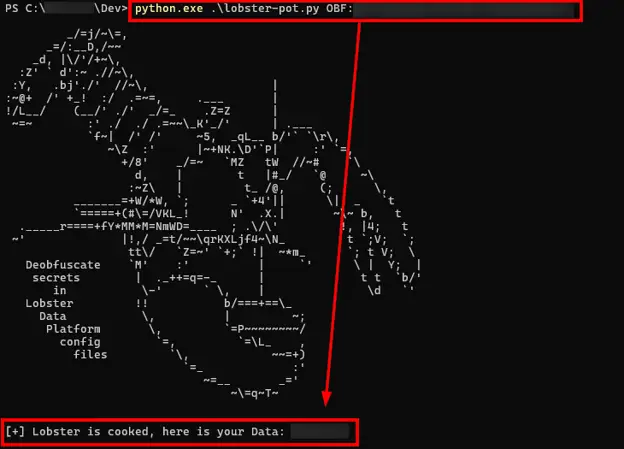
Security Recommendations
Obfuscation isn’t encryption. At best, it keeps curious onlookers from reading plaintext credentials in a configuration file. At worst, it gives a false sense of security while handing an attacker the exact key they need. In our case, cracking that SQL Server password was the entry point that let us pivot across the network, escalate privileges, and grab Domain Admin.
If you want to keep attackers from turning a simple config leak into a full network compromise, here is where to start:
- Protect credentials at rest: Ditch weak or custom obfuscation schemes like OBF:. If it can be trivially reversed, it shouldn’t be protecting production secrets.
- Use built-in strong encryption: Take advantage of Lobster Data’s stronger native options, like Password-Based Encryption (PBE) or Java KeyStore asymmetric encryption, to actually disrupt the attack chain.
- Lock down config file access: Apply strict OS-level permissions so non-administrative users can’t read sensitive files like database.xml in the first place.
- Restrict admin utilities: Limit access to powerful built-in web features like File Managers, which give users a backdoor into the file system without needing host OS credentials.