




A new Netexec module developed by Netragard allows for execution of arbitrary code via a variety of scripting languages by abusing the Machine Learning Services feature of SQL Server.
SQL Machine Learning Services Overview
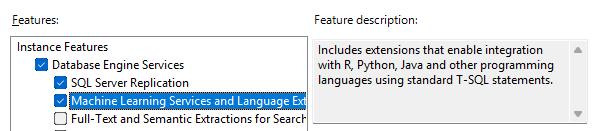
What Is SQL Server Machine Learning Services (MLS)
Microsoft SQL Server Machine Learning Services is an optional feature which allows users execute arbitrary scripts using a stored procedure called sp_execute_external_script.
The initial release of MLS was for SQL Server 2016. At that time, the only supported scripting language for MLS was the R language, which was fitting considering R’s popularity among data scientists at the time. Starting with SQL Server 2017, MLS was expanded to include support for Python, which seems to have usurped R as the preferred language for many data science and ML applications. In SQL Server 2022, the list of supported languages was expanded once again to include Java – though we have no just explanation for this, as it’s not the kind of coffee we believe in around here. As an honorable mention, SQL Server 2019 for Linux includes support for both R and Python.
While deployment of SQL MLS is outside the scope of this article, you can find more information about the evolution of MLS or step-by-step instructions for MLS setup on the official Microsoft website.
How sp_execute_external_script Enables Code Execution
Use of the sp_execute_external_script stored procedure is fairly straightforward, requiring only two string parameters. One parameter indicates the language to use, and the other parameter is for passing in the actual script to be executed. In this example, we are simply printing the version information for the locally installed R runtime. As long as we craft our scripts for compatibility within the query syntax and limit ourselves to usage of built-in language modules/libraries, we should be able to execute the query and obtain the script output without issue.

Offensive Opportunities in SQL Server Machine Learning Services
Classic SQL Server Abuse
Penetration testers are generally pretty familiar with classic techniques for abusing SQL Server such as using stored procedures like xp_cmdshell for executing arbitrary commands. However, so are defenders. This means that this stored procedure is often disabled as a best practice.
In cases where xp_cmdshell is enabled, it is still heavily monitored by EDRs and other security solutions. Because of this, xp_cmshell generally has limited utility, such as in cases where SQL Server auditing is not configured and no EDR is observed on the system. Thus, many times valid credentials to a SQL Server may be compromised during an engagement, but the team may be unable to pursue further to explore the potential attack path.

Why Machine Learning Services (MLS) Can Bypass xp_cmdshell Restrictions
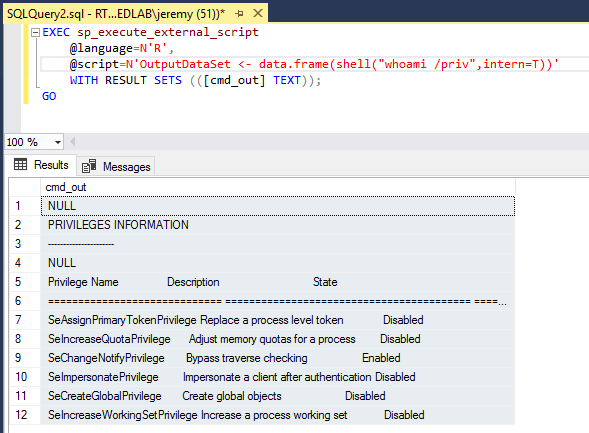
As mentioned previously, MLS uses a separate stored procedure named sp_execute_external_script which is enabled during deployment. Additionally, the process chain for commands executed in this was differs from the typical process chain observed during use of xp_cmdshell, potentially breaking some existing detections. It is also worth noting that when using xp_cmdshell, commands are executed in the context of the SQL Server service account. However, with MLS the scripts are executed by the SQL Server Launchpad service, which runs under the identity NT Service\MSSQLLAUNCHPAD by default.
While this account is fairly restricted, it does have some interesting privileges, rights, and access configured during deployment which open up some potential avenues for expanding access via code execution. Exploring these further is an exercise we will leave up to the reader.
Custom Netexec Module to Abuse MLS
Module Intro and Overview
To help streamline attack paths leveraging SQL MLS, Netragard has developed a custom Netexec (or nxc) module called exec_sqlmls. This module can be quickly loaded into Netexec to allow penetration testers to use the familiar framework for execution of these techniques.

This module accepts parameters via the standard Netexec module options mechanism to specify the script language to use and the operation mode. Each operation mode requires another parameter – for example, a local IP and port must be passed via SOCKET when using MODE=reverse_shell.
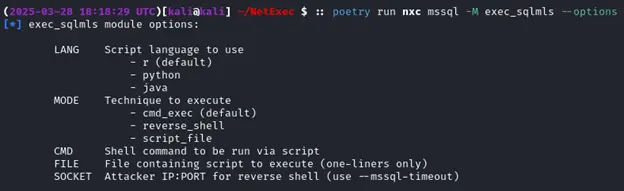
Next, we will demonstrate a few examples of how to use each of these modes.
Command Execution with R
The first (and default) mode, cmd_exec, is pretty straightforward. Generally there are no additional arguments needed aside from CMD, though you may wish to set –mssql-timeout as well if your command takes a while to return. Below, we are simply checking the service account under which the SQL Server Launchpad service is running.

Spawning Reverse Shell with R
Since we can execute virtually any R script as does not have any non-default dependencies, we crafted a basic reverse shell script to give us a more interactive command execution experience. Here, we simply need to specify MODE=reverse_shell and set the SOCKET option to the IP and port number where our local listener is running. Note that we have also set the –mssql-timeout parameter to 5 minutes to avoid a client timeout causing the SQL Server to abort the query and kill our shell.

Checking on our netcat listener, you can see we have successfully caught the reverse shell and are able to execute commands on the server successively for as long as the client connection remains intact.

Running Script File with R
The final technique implemented, MODE=script_file, allows penetration testers to specify an arbitrary script file to be loaded and executed via an MLS query. In this example, we have executed a simple R script that enumerates some basic information about the host on which it is run. It is worth noting that, due to an apparent limitation in Netexec’s sql_query(), multiline scripts cannot be executed. However, in most cases a script can be reformatted into a one-liner for compatibility without too much effort.

What else could we do with a custom R script? Most of us are familiar with xp_dirtree, xp_fileexist, and some of the other techniques we can use to perform coerced authentication attacks and solicit an inbound connection from the SQL Server. However, these are generally executed in the context of the SQL Server service account which may be less desirable in certain circumstances, and may also be more heavily monitored. In this case, we can use an R script to initiate an authenticated connection to our attacker machine over a protocol such as SMB or HTTP in order to either capture the server NetNTLMv2 hash or relay the connection elsewhere. Below is our example R script for coercion in action.

With a tool such as Responder running, we can observe that the coercion attack against the SQL Server was successful.

Future Developments
Python and Java
For now, the only fully implemented language within this Netexec module which supports all modes is the R language. Stay tuned for a “part two” of this blog where we will cover usage of other languages such as Python and Java within the exec_sqlmls module. At this time, the exec_sqlmls module has not been publicly released to the community.